


Importing photos to a computer
 Choose the corresponding mode
(press the button on the toolbar or choose Download photos mode in File menu).
Choose the corresponding mode
(press the button on the toolbar or choose Download photos mode in File menu).
In the new window you can choose image source (digital camera or card-reader disk), sorting type, and images you want to be copied (if you use SnapTouch for copying images on a regular basis press Select new button if you'd like to copy only new images).
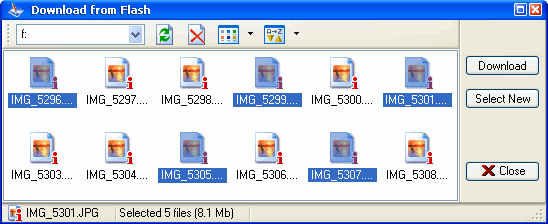
When images are chosen you can go to smart copying. Press Download button to open a window for customizing name format for image files to be copied.
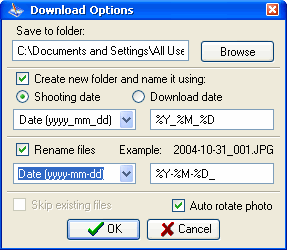
In Options you can specify:
- a place on your hard disk where images will be copied to;
- possibility and rules for creating subfolders. You can use predefined masques or create your own one with SnapTouch macroses (a list of macroses is below);
- possibility and rules for renaming files to be copied. You can use predefined masques for renaming or create your own one with macroses;
- the necessity of automatic rotation of photos. If you choose "Auto rotate photo" option, pictures, imported to the computer, will be automatically rotated from portrait orientation to landscape. SnapTouch gets information about the orientation from EXIF data of the photo file.
When you have chosen rules for copying images, press OK and your images will be placed on the hard disk. During this process, the images are not processed, but merely copied.
A list of macros to apply:
- %y - shooting year
- %m - shooting month
- %d - shooting day
- %h - shooting hour
- %n - shooting minute
- %s - shooting second
- %f - root directory
- %c - a model of camera
You can find further details about applying macroses in the chapter devoted to renaming image files. The principle is the same.


